REST - GET Method
Published: January 2026
SAP REST development enables ABAP-based systems to expose and consume RESTful services using standard HTTP methods such as GET, POST, PUT, and DELETE, allowing seamless integration with external applications and cloud platforms. A common approach in SAP NetWeaver and ABAP Platform is to implement custom HTTP services by developing an ABAP class that implements the interface IF_HTTP_EXTENSION, where the method IF_HTTP_EXTENSION~HANDLE_REQUEST serves as the single entry point for processing incoming HTTP requests. Within this method, developers can access request headers, query parameters, and payloads via the server object, apply custom business logic, and construct appropriate HTTP responses in JSON or XML format. This approach provides fine-grained control over request handling, authentication, error management, and response construction, making it suitable for lightweight REST APIs, custom integrations, and extensions where standard SAP REST frameworks are not required or are intentionally avoided.
Following is step by step procedure to develop the ABAP REST API:
Creating a Class and Method
Create a class through SE24 or SE80. Add interface IF_HTTP_EXTENSION.

When the interface IF_HTTP_EXTENSION is implemented, the system automatically generates the method IF_HTTP_EXTENSION~HANDLE_REQUEST, which serves as the entry point for all incoming external API requests. In a single ABAP class, multiple REST APIs can be exposed, and the processing logic for each API path should be delegated to a dedicated method. Accordingly, for the purpose of this document, a new method named USER_GET must be created to handle the specific processing for the corresponding request path.
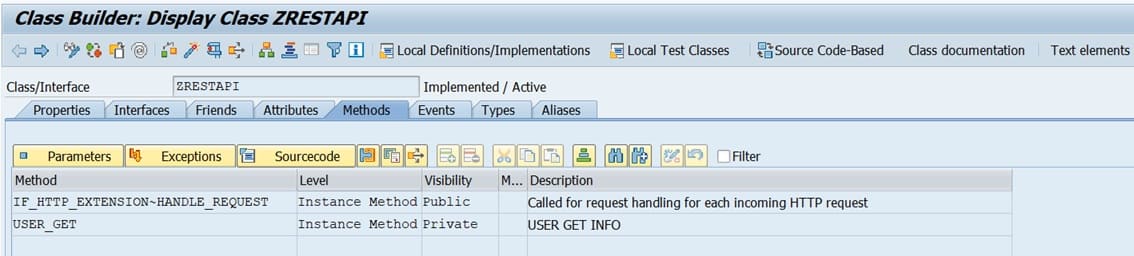
The following is codes on method IF_HTTP_EXTENSION~HANDLE_REQUEST:
METHOD if_http_extension~handle_request.
DATA: lv_path    TYPE string.
DATA: it_split TYPE TABLE OF string,
	  wa_split TYPE string.

DATA ld_code TYPE string. "aMRF10042025
DATA ld_custno TYPE string. "Add by YAN FS-I-FU-SD-P0368 30.06.2025

if_http_extension~flow_rc = if_http_extension=>co_flow_ok_others_opt.

DATA: lv_return_code TYPE char1,
	  lv_message     TYPE char100.

*      CLEAR: v_error, v_request, v_response.
*
*      "Allow other extensions to do something
*      if_http_extension~flow_rc = if_http_extension=>co_flow_ok_others_opt.

"Get Body Request
DATA(v_request) = server->request->get_cdata( ).

"Get Header Field
DATA t_header TYPE tihttpnvp.
server->request->get_header_fields( CHANGING fields = t_header ).

*      "Sanitize request
*      CALL METHOD me->m_sanitize_string( CHANGING request = v_request ).

"Get Endpoint
server->request->get_header_field( EXPORTING name = '~path' RECEIVING value = lv_path ).
TRANSLATE lv_path TO UPPER CASE.
SPLIT lv_path AT '/' INTO TABLE it_split.
LOOP AT it_split INTO wa_split.
  lv_path = wa_split.
  CONDENSE lv_path.
ENDLOOP.

CASE lv_path.
  WHEN 'USER_GET'.
*          me->m_deserialize_data( CHANGING data = v_savebooking_req ).
*
*          me->m_save_booking(
*            EXPORTING
**            im_request  = v_savebooking_req
*              im_req      = v_request
*            IMPORTING
*              ex_response = v_savebooking_res
*          ).
*
*          IF v_error IS INITIAL.
*            me->m_serialize_data( CHANGING data = v_savebooking_res ).
*          ENDIF.
*          BREAK-POINT.

	DATA respons_data_ TYPE string.
*        FIELD-SYMBOLS  TYPE STANDARD TABLE OF zlibuser.
	DATA: lt_zlibuser TYPE STANDARD TABLE OF zlibuser.
	SELECT * FROM zlibuser INTO TABLE lt_zlibuser.
	respons_data_ = /ui2/cl_json=>serialize(
			  data        = lt_zlibuser
			  compress    = abap_false
			  pretty_name = /ui2/cl_json=>pretty_mode-camel_case ).

	DATA: o_response_   TYPE REF TO if_http_response.
	o_response_ = server->response.
	o_response_->set_status( code = '200' reason = 'OK' ).
	o_response_->set_content_type( 'application/json' ).

	o_response_->set_cdata( respons_data_ ).
ENDCASE.

ENDMETHOD.
The following is codes on method USER_GET:
METHOD user_get.
DATA: lo_http_client TYPE REF TO if_http_client.

" ensure no popup as this is expected to run in background
lo_http_client->propertytype_logon_popup = lo_http_client->co_disabled.

*    "Set header element
*    lo_http_client->request->set_header_field(
*      EXPORTING
*        name = '~request_method'
*        value = 'POST'
*     ).
*
*
*    lo_http_client->request->set_header_field(
*      EXPORTING
*        name = 'Accept'
*        value = '*/*'
*     ).
*
*    lo_http_client->request->set_header_field(
*      EXPORTING
*        name = 'Content-Type'
*        value = 'application/json'
*     ).
*
*    lo_http_client->request->set_header_field(
*      EXPORTING
*        name = 'Authorization'
*        value = |Bearer { ld_token }|
*     ).
*
*
**    "Serialize Data
**    ld_request = zcl_ui2_cl_json=>serialize( data = i_service "lwa_request
**                 pretty_name = zcl_ui2_cl_json=>pretty_mode-camel_case ).
**    lo_http_client->request->set_cdata(
**      EXPORTING
**        data = ld_request
**    ).
*
*    " data sent in request body but not in the form of json, instead it is sent in html form format
*    ls_form_field-name = 'orderId'.
*    ls_form_field-value = i_order_id.
*    APPEND ls_form_field TO lt_form_fields.
*
*    ls_form_field-name = 'uniqueCode'.
*    ls_form_field-value = i_unique_code.
*    APPEND ls_form_field TO lt_form_fields.
*
*    ls_form_field-name = 'branch'.
*    ls_form_field-value = i_branch.
*    APPEND ls_form_field TO lt_form_fields.
*
*    ls_form_field-name = 'redeemDate'.
*    ls_form_field-value = i_redeem_date.
*    APPEND ls_form_field TO lt_form_fields.
*
*    ls_form_field-name = 'status'.
*    ls_form_field-value = i_status.
*    APPEND ls_form_field TO lt_form_fields.
*
*
*    lo_http_client->request->set_form_fields( fields = lt_form_fields ).
*
*    "Get Response
*    CALL METHOD lo_http_client->send
*      EXCEPTIONS
*        http_communication_failure = 1
*        http_invalid_state         = 2.
*    " check result
*    CALL METHOD lo_http_client->receive
*      EXCEPTIONS
*        http_communication_failure = 1
*        http_invalid_state         = 2
*        http_processing_failed     = 3.
*    IF sy-subrc EQ 0.
*      CALL METHOD lo_http_client->response->get_status
*        IMPORTING
*          code   = ld_code
*          reason = ld_reason.
*      ld_response = lo_http_client->response->get_cdata( ).
*      zcl_ui2_cl_json=>deserialize(
*            EXPORTING
*              json = ld_response
*              pretty_name = /ui2/cl_json=>pretty_mode-camel_case
*            CHANGING data = lwa_response ).
*
*      IF ld_code = '200'.
**        ex_success = lwa_response-success.
**        ex_message = lwa_response-message.
*        e_response = lwa_response.
*
*        lo_http_client->close( ).
*        FREE lo_http_client.
*      ENDIF.
*
*    ELSE.
*      CALL METHOD lo_http_client->response->get_status
*        IMPORTING
*          code   = ld_code
*          reason = ld_reason.
*
**      ex_success = abap_false.
**      ex_message = ld_reason.
*
*      lo_http_client->close( ).
*    ENDIF.

ENDMETHOD.
Setting SAP Gateway
Use transaction code SICF for this purpose.
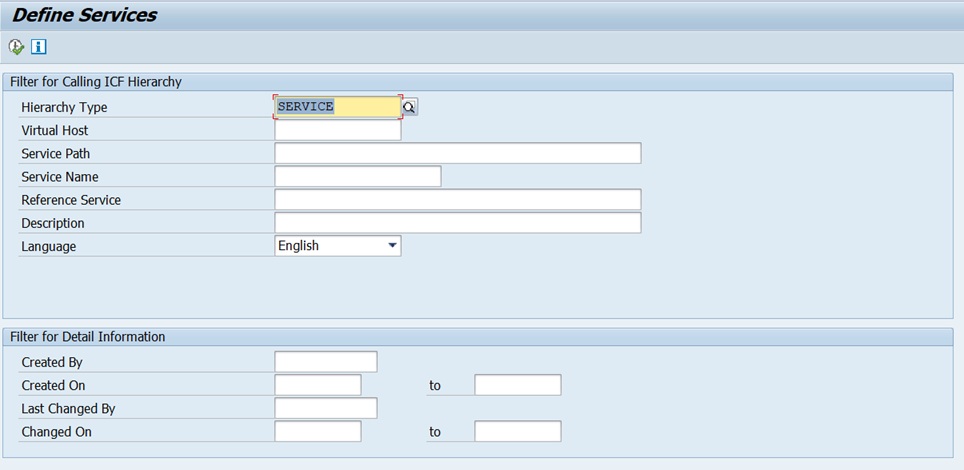
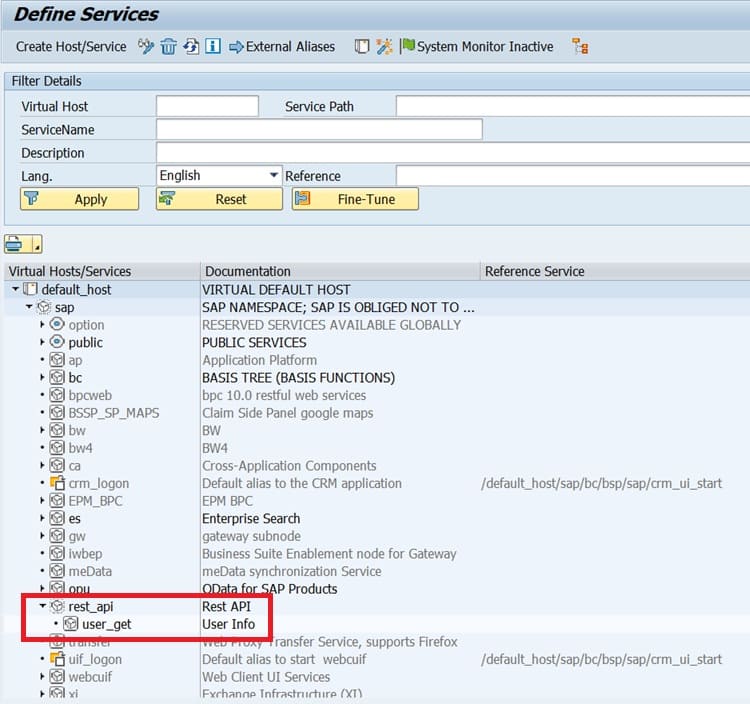
Right click on the hierarchy and create sub-element complete with its node.
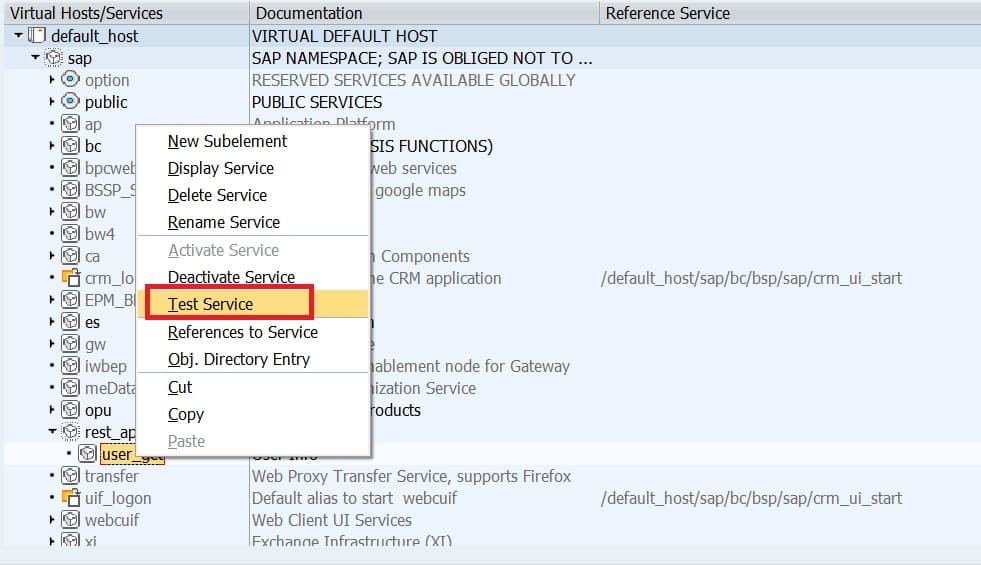
Testing the API
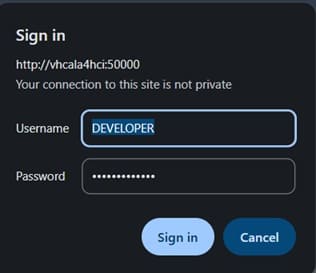
Testing can be done directly by right clicking on the node in gateway.
Key in user name and password.
...and this is the result:
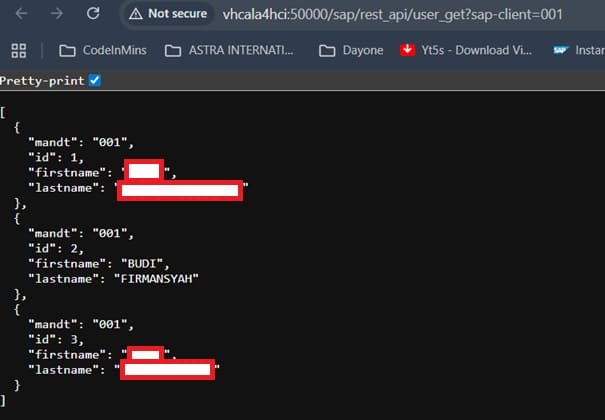
Testing can also be performed using tools such as Postman. Use the same endpoint URL obtained by right-clicking the SAP Gateway service: http://vhcala4hci:50000/sap/rest_api/user_get?sap-client=001
